

STEM workshop content
What Students Experience: The Development Studio
In this high-energy coding incursion, students transition from consumers of technology to digital architects. By mastering the fundamentals of algorithmic logic in a real-time programming environment, they develop the 21st-century skills needed to build the apps and games of the future.
1. Algorithmic Sequencing
Students begin by learning how machines read data linearly. They program a series of simple, logical steps to achieve specific outcomes, discovering that precision in sequencing is the foundation of all successful software.
2. Logic & Control
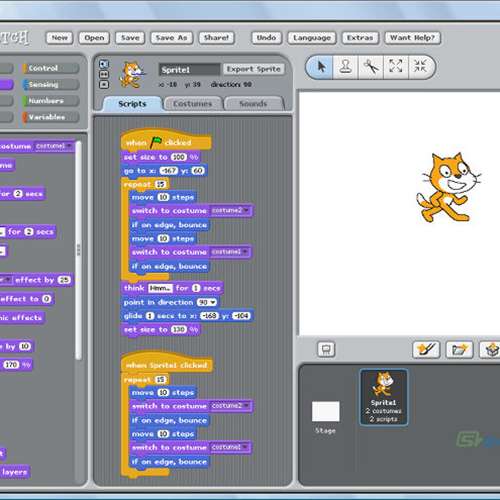
Using Scratch’s intuitive drag-and-drop interface, students tackle complex control structures. They learn to optimize their code using repeating loops and implement ‘if-then’ statements to give their programs the power to make decisions.
3. Creative Debugging
As their skills grow, students apply their logic to creative challenges. Whether building animations or multi-level games, they learn the art of ‘debugging’—using persistence and reasoning to solve problems when their code doesn’t behave as expected.
Our Commitment to Digital Literacy
A Trusted Technology Partner for Over 20 Years
Fizzics Education bridges the gap between play and programming. Our Know Your Code program ensures students walk away with transferable logic skills, not just a finished game.
We use industry-standard educational software (Scratch) that allows students to focus on logic rather than typing syntax.
Our curriculum is designed to scale with student ability, ensuring every child is challenged but never overwhelmed.
Facilitators are trained to encourage computational thinking, asking the right questions to lead students to their own “aha!” moments.
Australian Curriculum Mapping
Australian National Curriculum Mapping for all our STEM workshops & shows
Australian ACARA Content Outcomes:
Digital Technologies F-10 Version 9.0
Years 3 & 4
- Recognise different types of data and explore how the same data can be represented differently depending on the purpose AC9TDI4K03
- Define problems with given design criteria and by co-creating user stories AC9TDI4P01
- Follow and describe algorithms involving sequencing, comparison operators (branching) and iteration AC9TDI4P02
- Implement simple algorithms as visual programs involving control structures and input AC9S4P04
- Discuss how existing and student solutions satisfy the design criteria and user stories AC9TDI4P05
- Use the core features of common digital tools to create, locate and communicate content AC9TDI4P06
Years 5 & 6
- Explain how digital systems represent all data using numbers AC9TDI6K03
- Explore how data can be represented by off and on states (zeros and ones in binary) AC9TDI6K04
- Define problems with given or co-developed design criteria and by creating user stories AC9TDI6P01
- Design algorithms involving multiple alternatives (branching) and iteration AC9TDI6P02
- Generate, modify, communicate and evaluate designs AC9TDI6P04
- Implement algorithms as visual programs involving control structures, variables and input AC9TDI6P05
- Evaluate existing and student solutions against the design criteria and their broader community impact AC9TDI6P06
Australian National Curriculum Mapping for all our STEM workshops & shows

NSW K-10 Science Syllabus Mapping
NSW K – 10 Science Syllabus mapping
NSW Science & Technology Syllabus Content
A student:
- ST2-11DI-T describes how digital systems represent and transmit data
- ST2-2DP-T selects and uses materials, tools and equipment to develop solutions
- ST2-3DP-T defines problems, describes and follows algorithms to develop solutions
- ST3-11DI-T explains how digital systems represent data and form networks
- ST3-2DP-T plans and uses materials and tools to develop solutions
- ST3-3DP-T defines problems, and designs, modifies and follows algorithms
NSW Science and Technology K–6 Syllabus (Implementation from 2027)
Implementation advice at the NESA Science and Technology site.
Stage 2
ST2-DDT-02: Designs and uses algorithms, represents data and uses digital systems
- Use features of digital tools to locate, select, store and retrieve information
- Design algorithms using branching and iteration to program a procedure
- Explore data representation by letters, numbers, symbols, images and sounds
- ST2-DAT-01: Uses and interprets data to describe patterns and relationships
Stage 3
ST3-DDT-02: Creates, evaluates and modifies algorithms to code or control digital systems
- Develop design ideas to build a prototype using design criteria
- Test, evaluate and modify the prototype to meet user needs
- Explore how and why data can be represented as binary code
- Create, test and modify algorithms as visual programs
- ST3-DAT-01: Interprets data to support explanations and arguments
VIC Science Syllabus Content
Digital Technologies
Levels 3 & 4
- Define simple problems with teacher-provided requirements. VC2TDI4C01
- Represent algorithms involving sequencing, branching and iteration. VC2TDI4C02
- Implement algorithms as visual programs involving control structures. VC2TDI4C04
- Design simple user interfaces and compare designs. VC2TDI4C03
Levels 5 & 6
- Define problems with co-developed functional requirements. VC2TDI6C01
- Design algorithms involving multiple alternatives and iteration. VC2TDI6C02
- Implement algorithms involving control structures, variables and input. VC2TDI6C04
- Evaluate solutions against requirements and community impact. VC2TDI6C05
Session Requirements
👥 Capacity & Timing
👨🎓 Attendance: Max 32 students per class.
🏫 Target: Appropriate for Years 3 to 6.
⏰ Duration: Customizable (60 min standard).
🛠️ Set/Pack: 45 mins setup + 45 mins pack down.
📍 Venue Requirements
🏗️ Space: 7 tables and chairs for all students.
🔌 Power: Access to at least 2 electrical power sockets.
📝 Tech: A whiteboard & projector are useful but not necessary.
Go Further!
Complete Units of Work to Support Your Teaching
Support your classroom with 270+ syllabus-linked lessons, high-quality videos, and marking rubrics.
Save planning time with high-quality videos and experiments designed for Years 3 to 6 to engage with coding and computational thinking.
Extend the Experience
Pair this workshop with a larger stage show for groups of up to 240 students: