


STEM workshop content
What Students Experience: The Robotics Laboratory
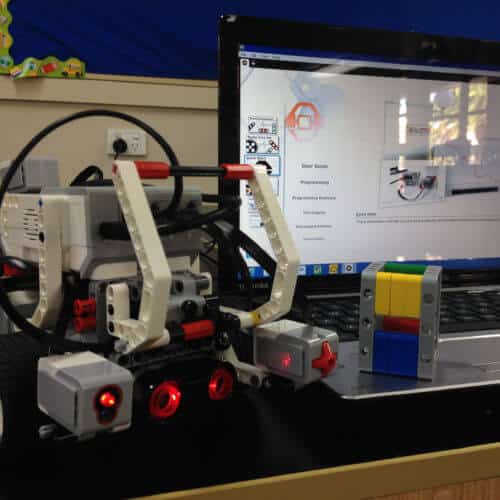
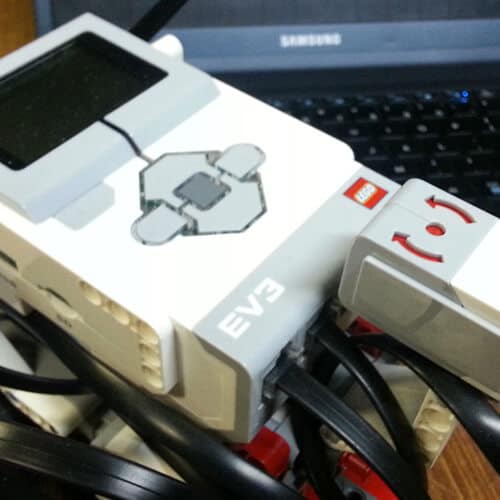
In this high-octane engineering workshop, students transition from building with bricks to building with logic. Through a series of increasingly complex missions, they learn to master the LEGO EV3 Mindstorms ecosystem, developing the persistence and problem-solving skills essential for 21st-century innovation.
1. Kinetic Control
- Program motors to accelerate, brake, and reverse in sequence.
- Master point and curve turns by varying motor power.
- Utilise loop-based programming to drive in a perfect square.
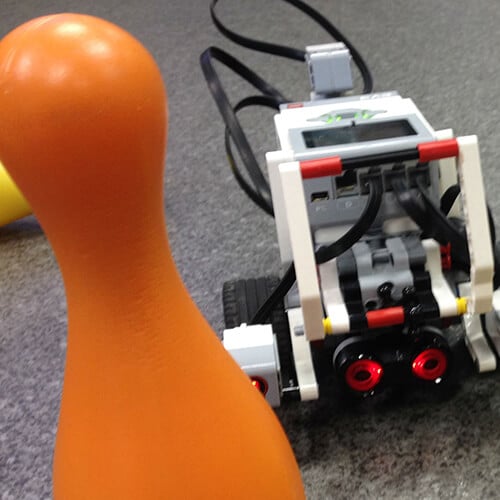
- Clear obstacle courses using precise movement sequences.
2. Sensory Integration
- Program robots to react to acoustic triggers like hand claps.
- Calibrate light sensors to detect ambient room levels.
- Deploy touch and ultrasonic sensors to avoid solid collisions.
- Measure and apply force for sports challenges like hockey or golf.
3. Advanced Logic
- Execute complex line-following logic using light detectors.
- Negotiate intricate mazes using autonomous sensor feedback.
- Program creative routines, including robotic dance-offs.
- Perform advanced sensor calibration for high-stakes accuracy.
Real Results in Real Schools
Our students were fully immersed in the world of robotics today! It was fantastic to see them applying logical thinking and sensor feedback to clear the obstacle courses. A great STEM experience.
Thanks to Russell from Fizzics Education for a fabulous Robotics Day! Our students loved the hands-on programming and the competitive challenges. #STEMed #PBL
⬅️ Swipe to see more examples ➡️
Professional Engineering Pedagogy
A Trusted STEM Partner for 20+ Years
We provide the hardware, the expertise, and the curriculum-aligned missions that turn a classroom into a high-functioning robotics lab.
Australian Curriculum Mapping
Australian National Curriculum Mapping for all our STEM workshops & shows
Australian ACARA Content Outcomes:
Digital Technologies F-10 Version 9.0
Years 3 & 4
- Recognise different types of data and explore how the same data can be represented differently AC9TDI4K03
- Define problems with given design criteria and by co-creating user stories AC9TDI4P01
- Follow and describe algorithms involving sequencing, comparison operators (branching) and iteration AC9TDI4P02
- Implement simple algorithms as visual programs involving control structures and input AC9TDI4P04
- Discuss how existing and student solutions satisfy the design criteria and user stories AC9TDI4P05
- Use core features of common digital tools to create, locate and communicate content AC9TDI4P06
Years 5 & 6
- Explain how digital systems represent all data using numbers AC9TDI6K03
- Explore how data can be represented by off and on states (zeros and ones in binary) AC9TDI6K04
- Define problems with given or co-developed design criteria and by creating user stories AC9TDI6P01
- Design algorithms involving multiple alternatives (branching) and iteration AC9TDI6P02
- Generate, modify, communicate and evaluate designs AC9TDI6P04
- Implement algorithms as visual programs involving control structures, variables and input AC9TDI6P05
- Evaluate existing and student solutions against design criteria and community impact AC9TDI6P06
Australian National Curriculum Mapping for all our science workshops & shows
NSW K-10 Science Syllabus Mapping
NSW K – 10 Science Syllabus mapping
NSW Science & Technology Syllabus Content
A student:
- ST2-11DI-T describes how digital systems represent and transmit data
- ST2-2DP-T selects and uses materials, tools and equipment to develop solutions
- ST2-3DP-T defines problems, describes and follows algorithms to develop solutions
- ST3-11DI-T explains how digital systems represent data and form networks
- ST3-2DP-T plans and uses materials and equipment to develop solutions
- ST3-3DP-T defines problems, and designs, modifies and follows algorithms
NSW Science and Technology K–6 Syllabus (Implementation from 2027)
Implementation advice at the NESA Science and Technology site.
Stage 2
ST2-DDT-02: Designs and uses algorithms, represents data and uses digital systems
- Design algorithms that use branching and iteration to program a procedure
- Explore how data can be represented by letters, numbers, symbols, images and sounds
- Select, enter and represent different types of data using digital tools
- ST2-DAT-01: Uses and interprets data to describe patterns and relationships
Stage 3
ST3-DDT-02: Creates, evaluates and modifies algorithms to code or control digital systems
- Develop design ideas to build a prototype using design criteria
- Recognise that data are entered, processed and transmitted in digital systems
- Explore how and why data can be represented as binary code
- Create, test and modify algorithms as visual programs that include branching and iteration
- ST3-DAT-01: Interprets data to support explanations and arguments
VIC Science Syllabus Content
Digital Technologies
Levels 3 & 4
- Define simple problems with teacher-provided requirements. VC2TDI4C01
- Represent algorithms involving sequencing, branching and iteration. VC2TDI4C02
- Implement simple algorithms as visual programs involving control structures. VC2TDI4C04
- Design simple user interfaces and compare designs. VC2TDI4C03
Levels 5 & 6
- Define problems with co-developed functional requirements. VC2TDI6C01
- Design algorithms involving multiple alternatives (branching) and iteration. VC2TDI6C02
- Implement algorithms involving control structures, variables and input. VC2TDI6C04
- Evaluate solutions against requirements and community impact. VC2TDI6C05
Session Requirements
👥 Capacity & Timing
👨🎓 Attendance: Max 32 students per class.
🏫 Target: Appropriate for Years 3 to 6.
⏰ Duration: 90 mins or 3 hours per class
🛠️ Set/Pack: 45 mins setup + 45 mins pack down.
📍 Venue Requirements
🏗️ Space: 7 tables and wide floor space for robot testing.
🔌 Power: Access to at least 2 electrical power sockets.
🪑 Seating: Chairs are not required for students.
Go Further!
Complete Units of Work to Support Your Teaching
Support your classroom with 270+ syllabus-linked lessons, high-quality videos, and marking rubrics.
Save planning time with high-quality videos and experiments designed for senior primary learners to engage with the science of robotics and engineering.
Extend the Experience
Pair this workshop with a larger stage show for groups of up to 240 students: